
Overview | News | Windows | macOS | Android | iOS | Audio Formats | Components | Encoder Pack | Screenshots | Help & Support | Developer | Old Versions | Other Projects
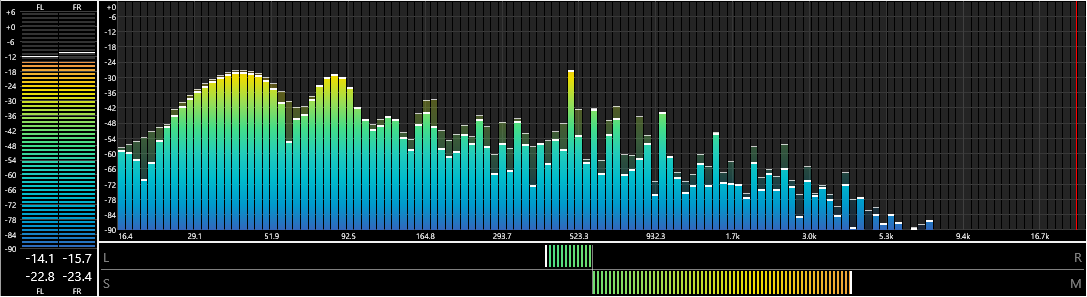
Spectrum Analyzer
By: pqyt
Version: 0.7.0.0, released on 2024-02-12 (archived)
Change log:
-
New: The cover art of the playing track can be used as background image.
- Opacity can be specified.
- The dominant color of the cover art can be used as a filler.
-
New: The dominant colors of the cover art can be used to generate a gradient.
- Color scheme "Artwork" turns on the feature.
- Between 2 and 256 colors can be selected.
- Lightness threshold determines which light colors will be ignored.
- New: The Curve visual has a peak line.
- New: Dark mode support.
- New: Fading AIMP peak mode, a combination of AIMP and Fade Out mode.
- New: Acoustic weighting filters (A-, B-, C-, D- and M-weighting (ITU-R 468))
- New: Brown-Puckette constant Q transform.
- New: Full Screen mode for Columns UI.
- New: File path of the artwork can be specified as a file path or a title formatting script that returns a file path.
-
New: Styles. Moved all the fragmented visual parameters (color, opacity thickness) into one unified style system.
- Upon first use the old settings are converted to styles and sensible defaults are set for the new features.
- The "Draw Band Background" option has been removed. It has been replaced by the color source of the dark and light band color.
- The "Artwork & Dominant Color" background mode has been removed. It has been replaced by the Dominant Color source.
- New: The background and curve peak line and area can be styled.
- New: Tooltips that provides some explanation about the various configuration settings.
- Changed: X-axis mode 'Octaves' shows only 'C' notes; Mode 'Notes' shows all notes.
- Improved: Curve mode can use a horizontal gradient.
- Improved: The curve is no longer visible as a flat line when no track is playing.
- Improved: Curve mode no longer has vertical lines at the beginning and the end of the spectrum.
- Improved: The Curve line color can be specified.
- Improved: The Curve Peak line color can be specified.
- Improved: Bar width and peak indicator thickness get rounded to pixels for a more visually pleasing result.
- Improved: Minor performance optimizations due to styles.
- Improved: Optimized the calculation of the Curve visual.
Supported systems: Windows 32-bit, Windows 64-bit.
advertisement dBpoweramp Video Converter
pro-quality video conversion
Batch convert videos using familiar dBpoweramp interface
dBpoweramp Video Converterpro-quality video conversion
Batch convert videos using familiar dBpoweramp interface
Links
View version history
View latest version and component description
Home page
Documentation
Discussion
Source code
advertisementdBpoweramp Video Converter
pro-quality video conversion
Batch convert videos using familiar dBpoweramp interface
How to install a component?
dBpoweramp Video Converterpro-quality video conversion
Batch convert videos using familiar dBpoweramp interface